Whenever I click the link of a new post by Armorama (or AeroScale) the associated images never load.
By right-clicking the placeholder and selecting ‘Open image in new tab’ I’ve determined that this is due to Cloudflare rejecting the request because I get the ‘Checking you a human’ page.
Not a criticism (I also have to use CF on my website), but might there be a way to set up rules on the affiliate sites to accept requests coming from KitMaker?
I have checked and as far as I can see Cloudflare’s normal exception to file scraping (other websites showing your images) don’t apply when you are using the “Under attack” mode that requires the are you human verification. I have already added our domains and IP to the allow list and that has had no effect. Actually the way worse effect it’s having for Armorama/AeroScale is that our Facebook posts now don’t display an image as well.
Honestly for all the people complaining in forum… you should be visiting the sites regularly anyway and not have to come to the forums to see content. Remember… the forum was setup to support the sites, not the other way around. I hope everyone takes that as intended, in that WHERE you are bookmarking to arrive here has more to do with how much you see on those sites than this issue of images not showing up in the forums. For a year or more we had no images in content site posts on the forum and everything was fine. Now people seem to be using the forum as some guide to see if there is something interesting to see on the sites. Again the ONLY reason site posts show up here is to facilitate the chat showing up on Armorama, AeroScale, etc. It’s not so people can find content to look at. If you aren’t bookmarking the sites and visiting them regularly then that’s a problem for the long term survival of the content sites.
I understand the “Am I Human” thing is a inconvenience, but until I understand what is causing it out of the 5 million server requests we get a day, it’s going to have to remain up for the time being. The reality is this is pushing me towards a full over-haul of the content engine (again) and moving to something more stable and less server resource intensive (like our forum software). The age of solo web developers creating code that runs busy and complex sites is disappearing I’m afraid.
Apologies Jim, I wasn’t trying to start something. I’m just alert to these issues because I’m having bot trouble on my site too.
From tomorrow (start of a new month) I’ll be reverting “I’m under attack” on my site and trying to determine a set of rules that does not require that particular setting as it’s suggested as a last resort only by CF.
Let me know if you think a continued dialogue would be helpful. I’m not an expert but I am a software developer.
I understand where you’re coming from, but in all honesty you’re likely working with two types of users: regular, dedicated Kitmaker users, who use the forums over everything else, vs non users who just occasionally visit for news or off a random google hit. On this board you’re only talking to a small subset (I hope!) of the main site’s daily traffic
This is my favorite modeling site on the internet but I’m not sure people will change their behavior to suit what’s best for the owner’s plan. I mean that in the best way. The forum is why I and many others use this site—I can get news of kit releases etc from any of the daily retailer spam emails I get.
If using the forum to read the news alerts is a problem, then I’d suggest you just stop the system posting them to the forums. Because that’s by far the easiest way for us to access them.
Thanks for all you do.
EDIT: For the record, I use the site every other day or so on my work computer and still get the “are you a human” prompt every time.
I agree 100%. On the one hand I understand why “they” need to confirm I’m yooman. On the other hand I’m damned if I have to justify my existence to anyone.
So it was nice while it lasted, posting new releases on these forums. Now I/we just need to alter our habits, probably going to each manufacturer’s website direct every month to see what their new releases are.
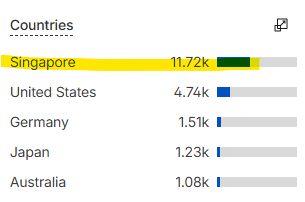
I first head to the ‘Cloudflare > Analytics’ page, expand ‘Top Statistics’ and look at ‘Countries’ which is quick way to identify bad actors. In this case Singapore can’t possibly justify its traffic.
At this point I make a judgement about the value of that entity to me. Since I’m not selling anything it’s a fairly easy choice I can implement as heavy handed approach as I like.
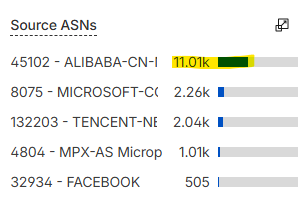
Previously, and because I was fighting fires, this involved setting up a rule to block the ASN number in ‘Security > Security Rules’. However now that I have had time to breath I’ve devised a plan that requires no one to be blocked so it may also work for you.
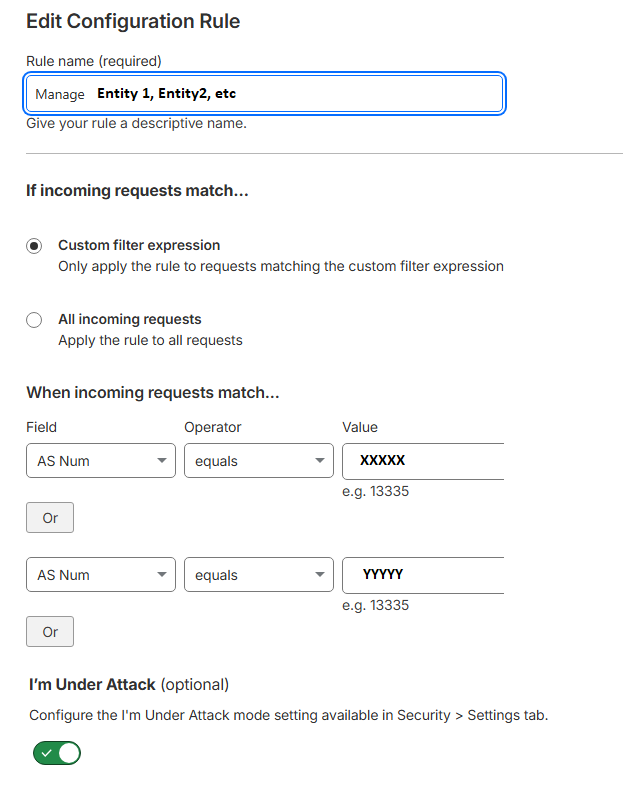
This involves the ‘Rules > Overview’ page that allows you to selectively apply ‘I’m under Attack’ to specific entities whilst leaving everyone else unaffected
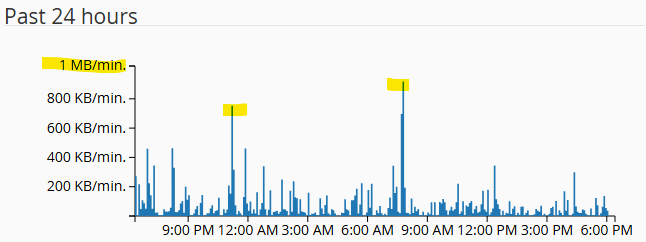
This seems to work for me and helps me feel less helpless in the face of what are in affect DDOSes because my site will go offline if I run out of bandwidth, but I am no expert and CF have just updated their portal which has thrown me a bit.
I did eventually find a similar solution for the bot attack mode on Cloudflare blocking our RSS feed with facebook and dlvr.it, so this info is helpful as well. So far so good it seems but they will be back at some point. Thanks!

 I can implement as heavy handed approach as I like.