Thank God. I can think of two members who will sleep better tonight.
1 Like
Thanks for your work, Jim! You’re the man! 
Oh, and thanks for keeping us at the bench the last few days! 
2 Likes
Okay… NOW it’s fixed. 
16 Likes
Thank you Jim, for all your work
Rabbits
2 Likes
Jim, I’d also like to say thanks for getting things like this sorted !
2 Likes
Well done Jim; I have to say though, I seemed to actually get a bit more done at the bench - as opposed to di*king around on the site(!)
3 Likes
Thank you to all those who keep this site going.
1 Like
I cannot post images - when I click on the picture frame icon nothing happens. Please advise- Thanks

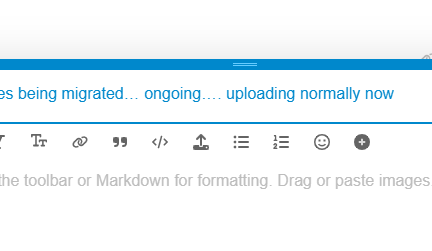
You are trying to click the icon in the middle of this screen? I don’t see ‘picture frame icon’.
Jim
In the text box there are nine icons - an m with an arrow pointing down / capital A , a B , an
italicized I , double T in two sizes. Linked paper clips ,quotation marks, picture frame with mountains / sun , smiley face , black circle with plus sign .
Sorry for the cumbersome description - I can’t take a screenshot. It is the seventh icon - the picture frame / mountains - that I use to load pictures from my photo library.
Hmm… guessing that is browser thing.

Clearly mine is working. And this one via mobile phone as well.
Anyone else having upload issues?
Never had problems before..
It could be something simple like a cached browser file or session variable. Did you try shutting down your browser and restarting?
I just tried loading photos on another site and no problems there. And , yes , I did try the shutdown trick.
Now when I hit the reply button at the end of a thread it scrolls backwards to the beginning of the thread … what is up with that ?
These are the icons I have:
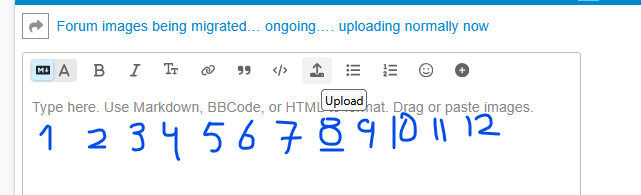
Nr 8 says Upload when the cursor hovers over it.
Nr 5, paperclips, is acktshually two links of a chain → insert link (url to somewhere else)
Nr 9 and 10 inserts lists, bulleted and numbered
Nr 12 is a little menu with some extra features.
I simply drag and drop images from my hard drive or Ctrl-V from the screen copy function.
Which browser and operating system are you using?
iPad OS18.6.2
Browser Safari